Section 7: Pipes #
There is no section code for today!
Question 1: Plumbing Pipes #
Mario the plumber recently switched careers to programming and is learning about pipes. He’s designing a program where a parent process spawns a child process that writes data to its parent process (which, in turn, reads the data) through a single pipe. However, Mario needs help understanding why his program works and how the pipe buffer in the OS changes as his program executes. Note: Mario’s Pipe can store a maximum of 12 bytes at a time!
For each of the questions below, draw a picture on your whiteboard that shows:
- The contents of the pipe buffer (how many bytes are in the pipe and what order are numbers stored in).
- The state of the child and parent processes (blocked or not blocked).
- The state of the read and write ends of the pipe (open or closed).
- The state of the program (exited or not exited).
Below is an example picture format that we recommend you use:
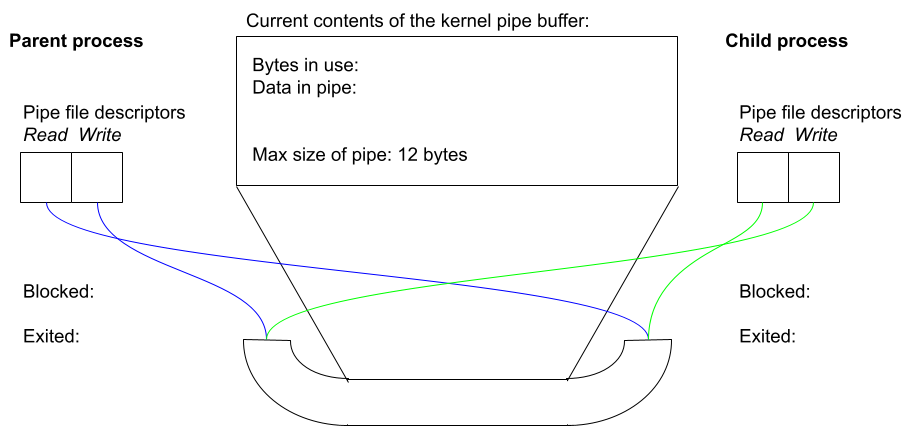
QUESTION 1A. Mario first runs the pseudocode below. Why does he close the read end of the pipe? What happens to the contents of the pipe buffer (how many bytes are in the pipe and what order are numbers stored in) after executing the code below?
Child Process:
    Close the read end of the pipe
    Write three integers 42, 6000, 123456789 into the pipe in that order
QUESTION 1B. What happens to the contents of the pipe after executing the code below?
Child Process:
    Write one integer, 7, into the pipe
    Close the write end of the pipe
    Exit
QUESTION 1C. What happens to the contents of the pipe after executing the code below?
Parent Process:
    Close the write end of the pipe
    Read two integers from the pipe
QUESTION 1D. If the child process now resumes from where it left off in 1B, what happens to the contents of the pipe buffer?
QUESTION 1E. What happens to the contents of the pipe after running the code below? What state is the parent process left in?
Parent Process:
    Read three integers from the pipe
    Close the read end of pipe